
Kinescope pricing plans: How to Choose and Pay
Kinescope has three pricing plans and pay-as-you-go billing — there is a suitable option for every business and project. Below are plan descriptions, billing rules, and calculation examples.
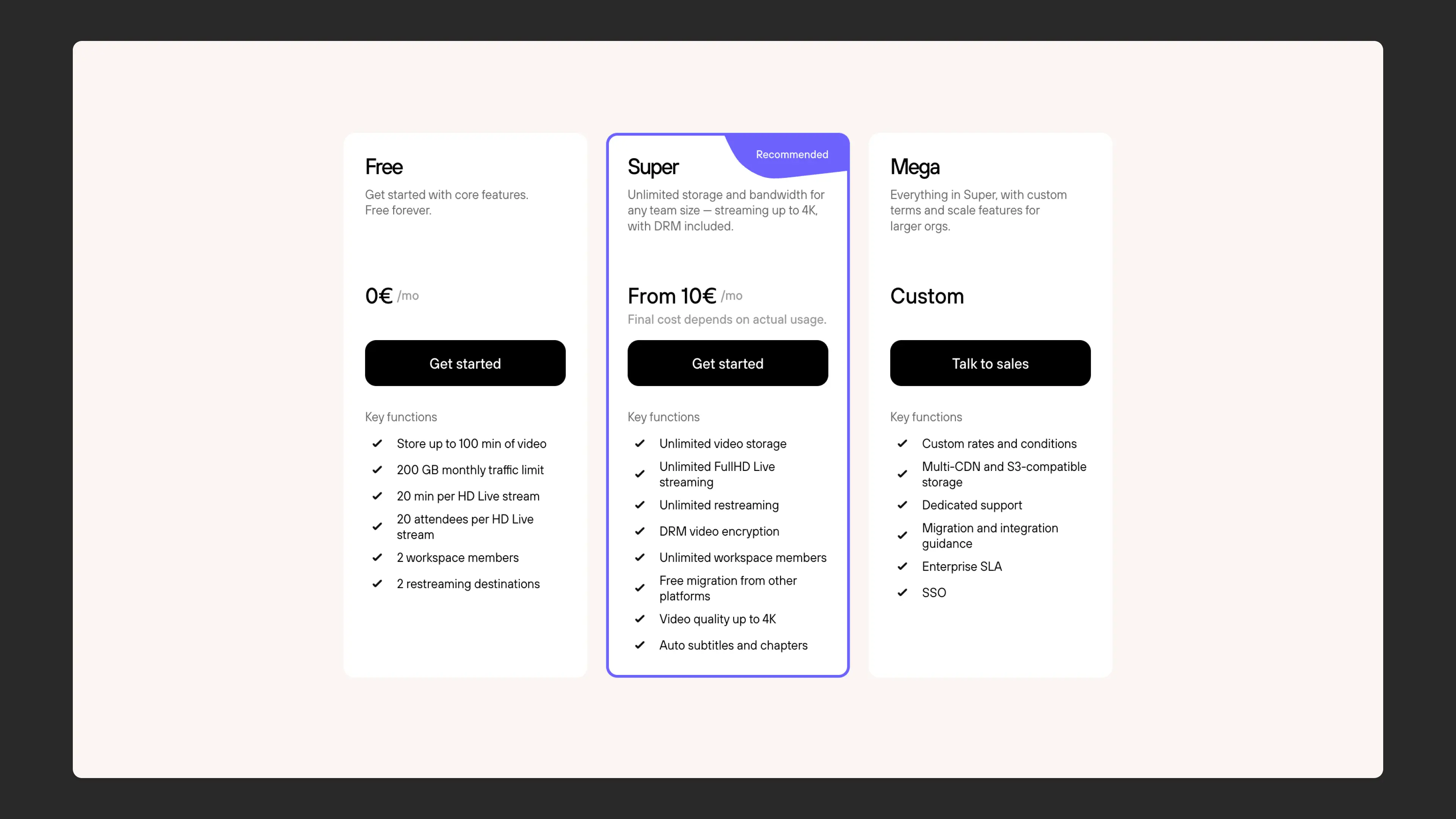
How to choose a plan?
Choose a plan based on your needs and project scale:
Free plan is suitable if you are testing the platform, working on a small project, or a landing page with a few videos. This way you can get familiar with Kinescope’s capabilities without paying.
“Super” plan is suitable for educational platforms, media projects, and businesses where video is the primary content. Choose it if you have outgrown the free plan’s limits or if you plan to work with video regularly from the start.
“Mega” plan is for large projects: media holdings with large archives, LMS systems, and streaming platforms. It is suitable if you need individual terms, a guaranteed SLA, and dedicated support.
If at least one of these scenarios fits you — read on. Below you will find a detailed description of each plan and cost calculation examples.
Free — for small projects and platform testing
Suitable for personal use, small projects, landing pages, and platform testing.
What’s included:
- Basic platform features for working with video
- Storage and streams with volume limits
- Limited platform functionality
This way you can get familiar with Kinescope without paying. When you need more features, you can switch to the “Super” plan at any time.
Super — for regular video work
Suitable for educational or media projects, as well as for those who have outgrown the free plan.
What’s included:
- Unlimited video storage
- Unlimited streams
- Full content protection
- Video quality up to 4K
- Standard technical support
How billing works:
On the “Super” plan, billing works on a pay-as-you-go principle. You pay only for the resources actually consumed per month. This is similar to paying utility bills by a meter. Billing is calculated on the 1st of the following month.
Mega — for large projects and non-standard requirements
A plan for projects with large content and traffic volumes, or special infrastructure and support requirements.
Usage examples:
- Media holdings with huge video archives
- LMS systems for educational platforms
- Streaming platforms
- Projects with special infrastructure requirements
What’s included:
- Individual payment terms
- Guaranteed SLA level
- Dedicated technical support
- Observability — system metric monitoring
- Custom infrastructure configuration, if needed
If your project requires a special approach and guarantees, the “Mega” plan may be right for you.
What makes up pay-as-you-go billing?
The amount due is made up of three indicators. Let’s look at each in detail.
1. File storage volume
Everything stored on Kinescope servers is counted:
- Original video, if original storage is enabled in your account
- Video versions in different qualities
- Audio tracks
- Attachments
- Subtitles
The data volume is recalculated daily. If you deleted some data in the middle of a month, the amount due on the 1st of the new month will be lower. You can track all changes in the invoice details.
2. Data transfer traffic (CDN)
This is the volume of data in GB delivered to viewers from the Kinescope server. Traffic during the initial upload of video to the server is not counted.
Example: Your video in 1080p quality weighs 1 GB. A viewer watched half of it — you will only need to pay for 0.5 GB of traffic.
3. Video transcoding
When a video is uploaded, Kinescope creates additional versions in different qualities (for example, 1080p, 720p). This is needed for adaptive delivery — the viewer gets the quality suited for their internet connection.
Transcoding is billed per minute for each new video upload. Unlike traffic and storage, which are billed monthly, transcoding is paid once upon upload.
Example of volume increase after processing:
If your source file weighs 41 MB, after upload and processing in Kinescope the total file volume increases to 110 MB. This happens because the system creates video versions in different qualities for adaptive delivery.
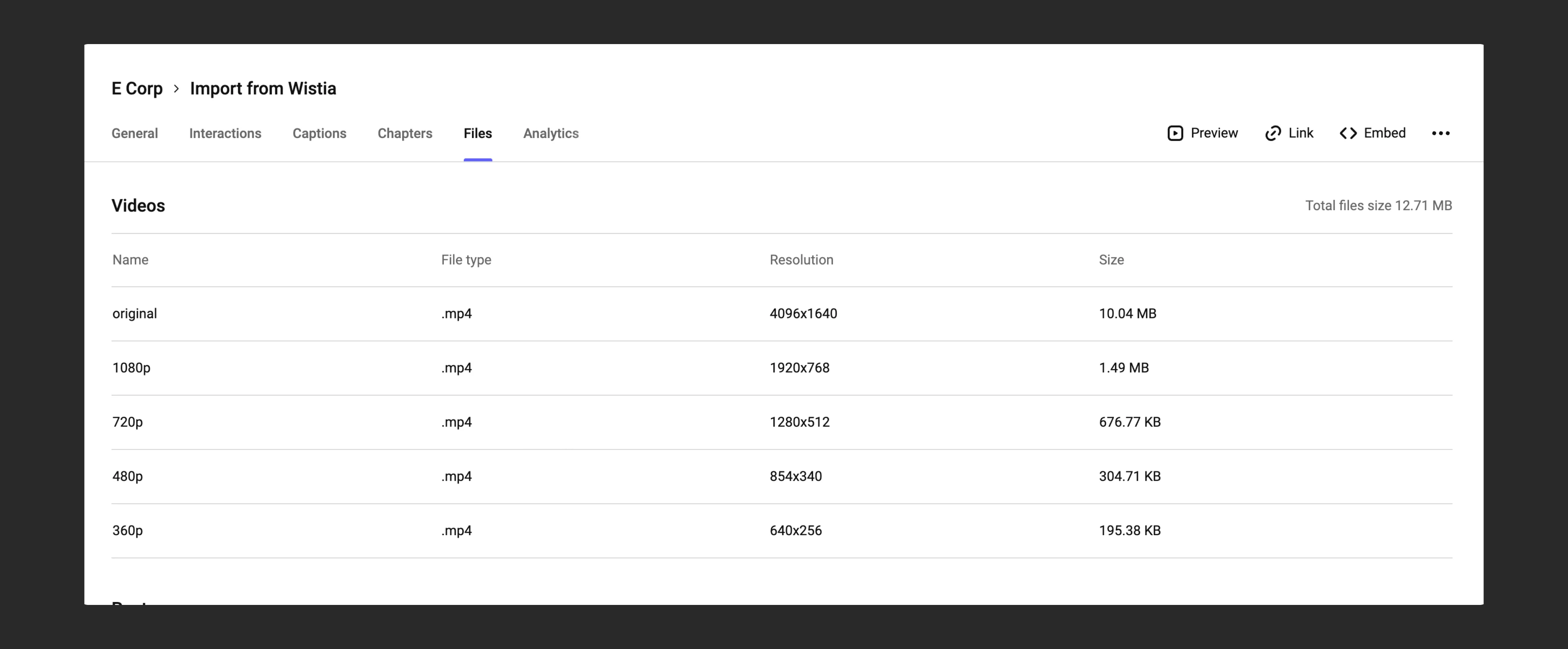
How to enable or disable original storage:
The original is the source file you uploaded to Kinescope. Whether it’s stored depends on when your account was created. To change this setting, write to the support chat within the Kinescope interface:
- New accounts (since September 2026) — originals aren’t stored. If you enable original storage, their volume will be added to your storage costs.
- Accounts created earlier (before September 2026) — originals are stored. Disabling original storage reduces storage costs, but the responsibility for preserving originals shifts to you.
How to calculate cost?
To estimate your monthly costs, apply the prices in the table below to your storage volume, CDN traffic, and minutes of newly uploaded video. Prices are tiered: the larger the volume, the lower the price for each additional GB or minute.
| Content type | Price (€) |
|---|---|
| 1. CDN traffic per GB | |
| First 1,000 GB | 0.03 |
| Next 5,000 GB | 0.02 |
| Next 15,000 GB | 0.015 |
| Next 30,000 GB | 0.01 |
| More than 51,000 GB | Custom |
| 2. Storage per GB | |
| First 1,000 GB | 0.03 |
| Next 20,000 GB | 0.02 |
| More than 21,000 GB | Custom |
| 3. Transcoding per minute of source video | |
| First 60,000 min | 0.01 |
| More than 60,000 min | Custom |
When and how to pay?
Kinescope uses post-payment billing. This means you do not need to make an advance payment or keep funds on a balance. An invoice is generated automatically on the 1st of each month for all services consumed in the previous month.
How to track expenses
You can monitor expenses in the Billing section. Information is updated once a day. You can also see the total outstanding balance for all time.
Detailed expenses:
To see detailed expenses, download a preliminary invoice in PDF or CSV format. You do not need to pay it — it is for information only.
Monthly invoices:
To view monthly invoices, go to the Invoices section. There you can:
- Change the billing address
- Specify an email for receiving invoices
- See all invoices with their statuses
- Download invoices
Payment options
Card payment — for individuals
You can link or update a card via the “Add payment method” button. Card charges happen automatically monthly. After successful payment, a fiscal receipt is sent to your email.
Bank transfer — for legal entities
To enable bank transfer, complete two steps:
- Add your company details in the Billing Address section
- Write to the support chat within the Kinescope interface requesting bank transfer activation
What’s next?
After choosing a plan and setting up billing, we recommend:
- Getting Started — main instructions for new users
- Creating your first project — uploading and publishing your first video
- Organizing your media library — creating projects and folders to structure content
Still have questions? Write to the support chat within the Kinescope interface — our specialists will help!